

Last checked and updated: September 23, 2026.
IN SHORT
- Playing with your own cards? Choose a webcam platform: SpellTable or Convoke.
- Testing a deck without a camera? EDHPlay offers a digital table in your browser. This is the preference of our own playgroup.
- More tools for webcam Magic? Convoke offers features such as Moxfield import, digital cards on your video feed, and links for match registration.
- You can start for free on all platforms discussed. EDHPlay and Convoke have paid extras; your webcam setup and physical deck may also cost money.
- The rules remain your responsibility. These platforms support gameplay but do not independently handle a full Commander game.
Our regular Commander group plays online frequently. After trying out several methods, we landed on EDHPlay: load a decklist, share a table, and play. But what works well for our group doesn't have to be the best choice for everyone.
Perhaps you want to shuffle your actual deck, use your new cards, or play with people from another city. That is why I am comparing EDHPlay, SpellTable, and Convoke here based on their practical differences. I have included Cockatrice as an alternative for those who prefer to install a program.
Start with this choice: real cards or a digital table?
Webcam: your physical deck
You aim a camera at your play area. You move and shuffle the real cards; your opponents follow along via video and audio.
Suits you if: you want to use your own collection and have space for a permanent setup.
Platforms: SpellTable and Convoke.
Digital: load a decklist
You play with card images on a shared table. You don't need an overhead view of your desk and can try out a deck before building it physically.
Suits you if: you want to play without a camera or enjoy testing various lists.
Platforms: EDHPlay and Cockatrice.
This is more important than a long list of features. A good webcam setup can be very pleasant to play with, while a digital table has its own buttons and actions to learn. Above all, choose something that your entire group can work with.
EDHPlay, SpellTable, and Convoke side-by-side
| Feature | EDHPlay | SpellTable | Convoke |
|---|---|---|---|
| Method of play | Digital table | Webcam Magic | Webcam Magic with digital tools |
| Installation | Browser | Browser | Browser |
| Physical deck needed? | No | Yes, for regular webcam play | Yes, for regular webcam play |
| Camera needed? | No | Yes | Yes |
| Players per table | 2–6 | Maximum 4 | Maximum 8 according to Convoke |
| Costs | Free basic; optional supporter extras | Free platform | Free basic; optional paid extras |
| Decklist | Load a digital list | Your physical deck lies in front of you | Moxfield import as a tool alongside your cards |
| What requires preparation? | Check deck and learn controls | Set up camera, light, and audio | Set up camera, light, audio, and desired tools |
| Logical starting point | Our regular group; digital deck tests | A group already using SpellTable | Webcam players wanting to try extra features |
Features can change. The mentioned player counts are platform capacities, not recommendations for ideal pod size. With four players, wait times and the overview are usually easier to manage than at a table with six or eight.
EDHPlay: Playing Commander without a webcam
EDHPlay is an independent, free-to-use digital play table in your browser. You load a decklist and play with card images. The platform supports two to six players and also offers solo playtesting: trying out your opening hands and first turns without opponents.
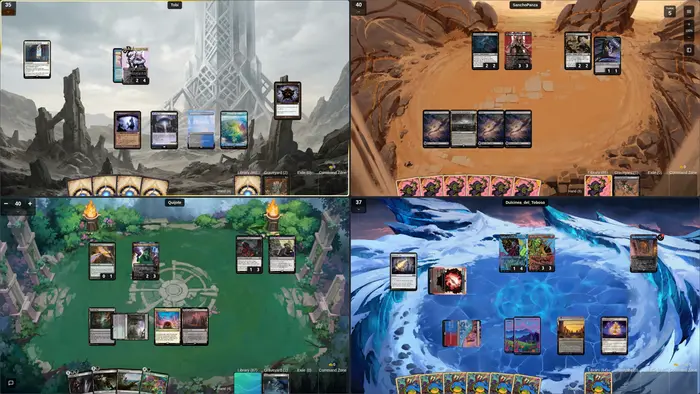
An important nuance: deck checks are not automatic game rules. EDHPlay can help check a list for format legality, but during the game, you decide whether an action is correct, which triggers go off, and when a spell resolves. You play with the same level of responsibility as at a regular table.
How to start with your group
- Try the demo or solo mode first. According to EDHPlay, no account is required for this. Practice drawing, tapping, and moving cards before everyone is waiting on you.
- Load your deck. Use the available import options or paste a text export of your decklist. Check your commander, quantities, and any misidentified cards afterward.
- Log in for multiplayer. Create a table with the correct number of seats and share the link. Choose a private table if you only want to play with friends.
- Check the connection and your audio. Agree on how you will talk, for example via a shared Discord call.
- Discuss decks and mulligans. Only then start the game.
If you use Moxfield, keep one current list there. If a link import doesn't work as expected, a text export is a useful backup option. Always check the loaded version: an old deck with three missing upgrades is still a different deck.
Where EDHPlay works well for us
For our playgroup, the main benefit is the absence of camera setups and reflections on sleeves. Everyone sees the same digital cards. That makes it easier to plan a game remotely and test new deck ideas.
The downside is that you have to learn the controls and you aren't holding your physical cards. You can choose digital printings, but that's different from putting your own foil on the table. According to EDHPlay, you can play on a phone; I would choose a larger screen for the first multiplayer game for a better overview.
The base game is free. Optional support via Patreon provides cosmetic and quality-of-life features. You don't need to purchase a subscription to get started with your group.
SpellArmory Tip
Use your first digital game as a practice round. Choose a deck you know and try a token, counter, and card move before the start. Learning a complicated new combo deck and a new interface at the same time makes it unnecessarily difficult for yourself.
SpellTable: with your real deck via Wizards
SpellTable is Wizards of the Coast's webcam platform. You use a Wizards account and play with your physical cards. The platform joined Wizards on August 17, 2020.
The platform combines camera images with tools to recognize cards and keep track of game information. That helps if a card on the other side of the table is hard to read. It remains dependent on the image provided by the camera: a sharp, well-lit card is easier to recognize than a partially covered card with a lamp reflection on it.
How to set up a SpellTable game
- Log in with your Wizards account and create a game or open your group's invitation.
- Give the browser access to the camera and microphone you want to use.
- Select the correct input devices and check if the entire play area is visible.
- Share the game link and test with each other whether video and audio are clear.
You can also use a phone as a camera. Wizards has an explanation for this with the option Use mobile device as webcam: you open the same game on your phone and use the same account. Buttons may be in different places due to updates; check the current input settings and test this before the game night.
My advice: if your group is already playing comfortably on SpellTable, there is no reason to move just for an extra feature. Start with what works. Discord can be an alternative for audio, but it is not a mandatory part of SpellTable.
Test briefly with the equipment everyone will be using before your first game night. Check if you can hear each other and can follow a full play area.
Convoke: webcam Magic with extra tools
Convoke is an independent community platform for webcam Magic. You play with a camera on your table but also get features to manage cards, contacts, and matches.
- Moxfield import: you can load a decklist and view cards during the game.
- Digital cards and tokens: search for a card and drag it onto your video feed, for example, if you are missing a suitable token.
- Social features: friends, invitations, public tables, and options to block or compliment players.
- Match registration: integrations with Playgroup and Mythic Track when enabled.
Convoke mentions up to eight players per game. That is more generous than the four players from the older version of this guide. More seats can be handy, but they don't automatically make a large Commander game faster.
Is the card recognition better than SpellTable?
Convoke presents its own AI card recognition as a strong point. That is a product claim by Convoke, not an independent comparison with your cameras, sleeves, and lighting. Try both platforms with the same table setup if recognition is your most important selection criterion.
Furthermore, an imported decklist does not mean the software automatically knows which physical card you just drew. Digital tools support your game administration; you remain responsible for correctly displaying your hand, board, and actions.
What is free and what is not?
Convoke calls the core of the platform free. There are paid supporter options, including for an ad-free experience and additional recording or registration capabilities. Unlimited match registration is listed under paid tiers. Check the current supporter options if statistics are the deciding factor for you.
My advice: try Convoke if you like playing with your physical deck and find the digital additions useful. When using digital tokens, clearly coordinate what they represent. This prevents an image on the screen and a physical marker from being accidentally read as two different permanents.
Cockatrice: an alternative with installation
Cockatrice is a free, open-source virtual card table for Windows, macOS, and Linux, among others. You install the program, retrieve card data with the Oracle tool, and build or import a deck. After that, you can test offline or connect to a server.
Here too, players perform the actions themselves. The official manual describes, among other things, drawing, shuffling, tokens, counters, and arrows to point out targets. You won't get an automatic referee handling every Magic interaction for you.
For a group that already knows Cockatrice, it can be a fine, permanent solution. For four friends who all still have to start, the installation is an extra step compared to EDHPlay. Download via the official project site and follow the corresponding quick-start guide.
A webcam setup that plays well
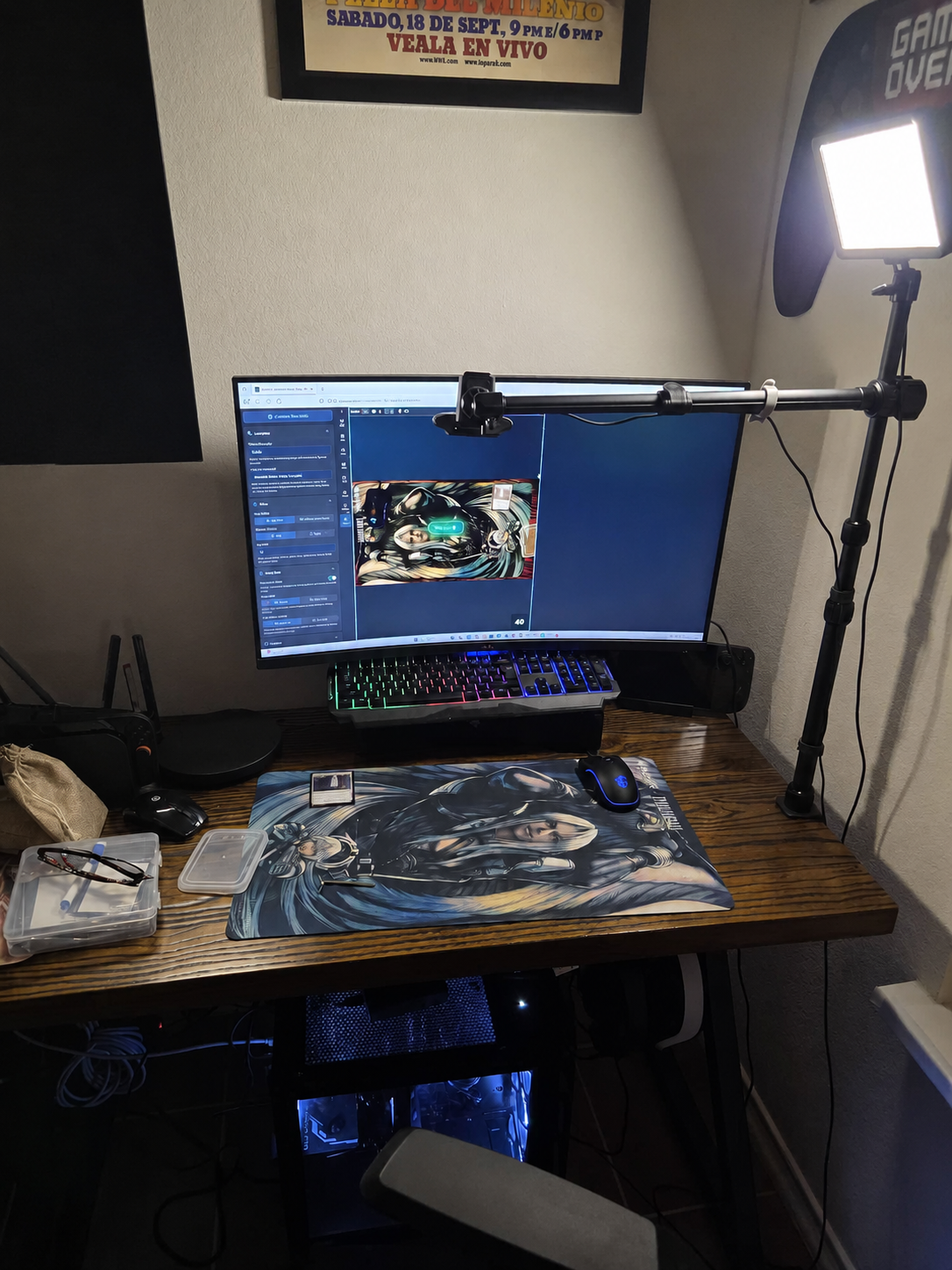
For both SpellTable and Convoke, the basics are the same: a stable overhead view, readable cards, and audible players. Start with the equipment you already have before buying an elaborate camera system.
1. Ensure a stable overhead view
Aim your camera as straight as possible at the play area. A mount that moves when you touch the desk makes the image jittery. Leave enough space for lands, creatures, commander, and graveyard. Also, check a card in the furthest corner of your mat, not just in the center under the lens.
2. Move the light first
If you see white spots on sleeves, move the lamp to the side and try a different angle. A more expensive camera won't automatically solve a bright reflection. Spread cards out sufficiently and clean the camera lens if the image remains blurry.
3. Keep audio simple
Preferably use a headset or earphones. Choose one audio channel for the group. If your phone, laptop, and Discord are all sending back the same audio, you will quickly get an echo. Turn off unnecessary microphones and speakers.
4. Keep your table readable
Do not place permanents completely beneath one another, announce played cards out loud, and use clear markers for counters. Make attackers visible and tell who you are attacking. An opponent at a distance cannot lean over the table to inspect an unclear board.
SpellArmory Tip
Before the first turn, have someone describe your board: which cards are there and what is tapped? If that is already difficult with five cards on the table, adjust your camera now. It only gets more crowded later in the game.
Finding fellow players and assembling a great pod
Start with friends, a local group, or the community links on the platforms' websites. EDHPlay and Convoke point to their Discord communities. Public tables are another possibility, but see primarily if the language, playstyle, and available time suit you. A large number of users says little about who is available on your game night.
For players in the region, our guide on playing MTG in Maastricht and Limburg contains more on finding fellow players.
Discuss more than just a power level number
Tell what your deck is trying to do and ask what the others expect. "A seven" says less than a concrete explanation. Discuss, for example, fast mana, combos, extra turns, proxies, and whether you mainly want to test or play a relaxed game.
How you can describe a table
"Dutch-speaking Commander pod, about two hours of time. I'm playing a modified precon with a creature plan. I'm looking for a relaxed game and am happy to explain the controls. Shall we coordinate about combos and proxies beforehand?"
That is an example of communication, not a fixed set of rules for everyone. You can read more about this in the unwritten rules of the table.
Online requires clearer communication
- Announce spells and targets. Give others space to react.
- Keep track of commander damage separately. Ensure it remains clear which commander the damage originated from.
- Discuss webcam-heavy actions. Taking over or viewing an opponent’s card sometimes requires a temporary digital representation or a clear marker.
- Agree on what happens if a connection is lost. Pause briefly and try to let the player return before drawing conclusions.
- Ask about recording or streaming in advance. Let others know what you are planning to do.
Common problems and initial solutions
| Problem | Try this first |
|---|---|
| No camera image | Check browser permissions, the selected camera, and whether another program is using the camera. |
| Card not recognized | Clear the area around it, remove your hand, and reduce glare. Search for the card manually if recognition continues to fail. |
| Echo or double audio | Use a single audio channel and turn off extra microphones and speakers. |
| Deck import is incorrect | Check counts and the commander separately. Try a text export and review the list before playing. |
| Too little screen space | Use a larger screen or a different layout. Start with a straightforward deck while you learn the interface. |
| Laggy connection | Stop large downloads, improve your connection, and let the group know you need to reconnect briefly. |
These are initial checks, not a guarantee that every problem can be solved locally. If issues persist, use the help page or community of the platform in question.
Which one should I choose?
For our regular digital sessions, EDHPlay remains my starting point. For us, the lack of a camera setup is the biggest advantage. If you want to use your own cards, start with the webcam platform your group already knows. Convoke is worth trying if the extra tools appeal to you.
Don't make the switch complicated. Test one platform with a familiar group and the same deck. After one game, you will know much better whether the controls, visuals, and communication work for you than you would by comparing twenty checkboxes.
EDHPlay in action: two explanation videos
These videos show the controls. A platform update may move buttons; use them as an introduction and check where a function is located in the current interface.
Explanation by EDHPlay itself
Open the EDHPlay explanation on YouTube.
Finding and creating a game
Watch the explanation from Mana Dorks on YouTube.
Frequently asked questions
Can I play Commander online without a webcam?
Yes. EDHPlay and Cockatrice use digital card images. With standard webcam play on SpellTable or Convoke, you show your physical board state.
Is everything completely free?
You can start for free on the discussed platforms. EDHPlay and Convoke offer optional paid extras. With webcam Magic, you also need your physical deck and a suitable camera setup.
Can I test a new decklist without buying all the cards?
A digital table lets you play with a loaded decklist. That is handy for trying out a plan. Do discuss the power level with your group: having access to digital cards doesn't mean every table expects a fully optimized deck.
Does the software automatically handle triggers and priority?
Do not count on that with these four platforms. You yourselves keep track of which actions are allowed and how they are resolved. An import check or card finder does not replace that knowledge.
Can we play with five or six players?
EDHPlay supports up to six players. Convoke mentions up to eight. SpellTable is designed for a maximum of four. With a larger pod, expect more wait time between turns.
Do I have to switch from SpellTable to Convoke?
No. If your group enjoys playing on SpellTable, switching is not necessary. Try Convoke if you are missing a specific feature, for example, digital tokens on your video feed or a link for match registration.
Taking an online deck idea to the real table?
Use your tests to discover what you enjoy. Our guide on building your first Commander deck will help you further. If you would rather find a complete starting point, take a look at Commander precons for beginners.
Sources and comparison
The features were verified based on official platform information on September 23, 2026. The preference for EDHPlay describes our playgroup. No independent performance or reliability test of all platforms has been conducted.
- EDHPlay: playing online, demo and features, and free usage and supporter extras.
- SpellTable: joining Wizards in 2020 and Wizards: webcam and phone setup. The historical setup guide may show older screens.
- Convoke: features, self-comparison and capacity, setups, and supporter options. Statements about superior card recognition have not been adopted as independently proven.
- Cockatrice: official download and start instructions and control manual.

Written by Omèr Cremers
Owner of SpellArmory, social worker, and full-time father. Avid MTG player and collector from Maastricht — Commander is my favorite format. Questions or additions to this guide? Feel free to send me a message.